Reports
Navigation: Sidebar → Reports
The Reports page provides financial analytics and insights for your MSP. View MRR trends, revenue by client, subscription analytics, and invoice aging — all with configurable date ranges.
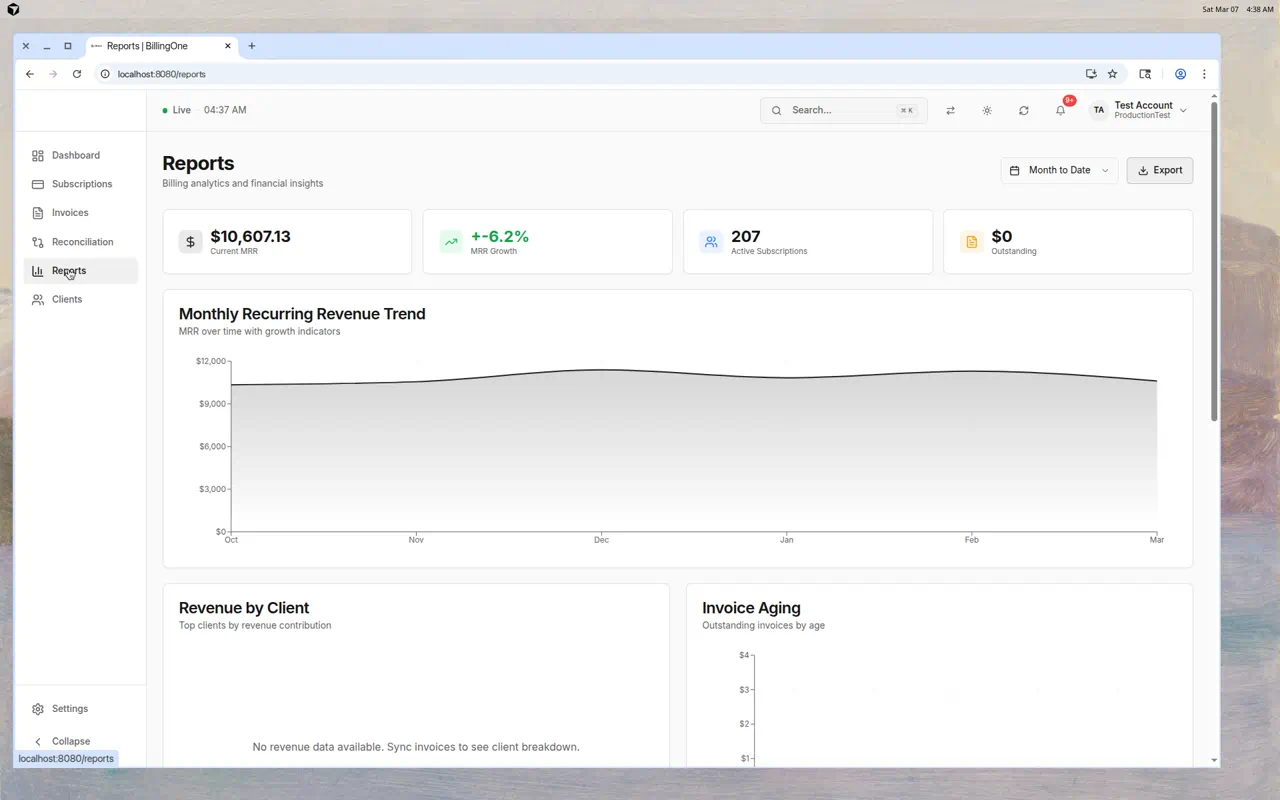
Key Metrics
Four summary cards at the top:
| Metric | Description |
|---|---|
| Subscription MRR | Active subscription MRR (same definition as the Dashboard) |
| Contract MRR | Recurring revenue from published service contracts (entity-profile qty projected where used) |
| MRR Growth | Percentage change in subscription MRR over the selected period |
| Active Subscriptions | Total active subscriptions |
Related ops reports (sidebar Reports menu): Accounts receivable (unified), Contract profitability, Deferred revenue, Client statements.
Date Range Selector
Choose the time period for your reports:
| Option | Period |
|---|---|
| Month to Date | Start of current month to today |
| Quarter to Date | Start of current quarter to today |
| Year to Date | Start of current year to today |
| Last 30 Days | Rolling 30-day window |
| Last 90 Days | Rolling 90-day window |
Report Sections
Monthly Recurring Revenue Trend
A line chart showing MRR over time with growth indicators. Use this to:
- Spot revenue trends (growing, stable, or declining)
- Identify seasonal patterns
- Track the impact of new client acquisitions or churn
Revenue by Client
A breakdown showing which clients contribute the most to your revenue. Useful for:
- Identifying your most valuable clients
- Finding revenue concentration risks
- Planning account growth strategies
Subscription Analytics
Insights into your subscription portfolio:
- Product mix analysis
- Subscription status distribution
- Term breakdown (monthly vs. annual)
Accounting invoice aging
Outstanding accounting invoice snapshots grouped by age (not the full unified AR page):
- Current (not yet due)
- 30 days overdue
- 60 days overdue
- 90+ days overdue
For generated + ledger + PSA open balances, use Accounts receivable.
Exporting Reports
Click Export to download a CSV summary (Subscription MRR, Contract MRR, trends, revenue by client, subscription metrics). PDF export is not available on this page.
Tips
- Review reports monthly — At minimum, check MRR trends and invoice aging each month
- Watch MRR growth — Negative growth needs investigation (churn? downgrades?)
- Use "Revenue by Client" for QBR prep — Know each client's contribution before meetings
- Monitor invoice aging — Don't let invoices age past 60 days without follow-up
- Compare periods — Switch between date ranges to spot trends